Safe Blast Logo
SAFE BLAST PLUG IN

The undo that survives closing the editor.

Unreal remembers your last few actions. Safe Blast remembers your last few weeks. It keeps a timestamped copy of every asset and level you save — and of the work you have not saved yet — and puts any of them back with one click.

Buy on Fab Marketplace Read the Guide
The Problem

Ctrl+Z has a very short memory.

You spend two hours arranging a level. You select a few too many actors, press Delete, and save. Now undo has nothing left to give.

You push a material for two days and it never gets better than it was on Wednesday. Wednesday is gone. A map opens broken and nobody knows when it broke. An asset was built the wrong way three weeks ago and everything since is standing on top of it. A sound asset is simply not there any more, and nobody deleted it on purpose.

None of that is carelessness. It is a normal week. The tool that should cover it — autosave — writes into a folder every troubleshooting guide tells you to delete, keeps a shallow history, and names the files so you cannot tell one from another.

Safe Blast keeps a real history instead: every asset you save, every few minutes of work you have not saved, named and timestamped, in a panel you can actually read.

“We already use Git.”

Good — keep using it. Source control is a different tool measured in a different unit. Perforce and Git work in commits: hours and days, made when you decide something is finished. Safe Blast works in minutes — the ones between those commits, where the accidental delete and the bad save actually happen.

Nobody commits before every experiment. Nobody commits at 2 a.m. after moving forty actors around. That gap is not a gap in your discipline; it is a gap in the tool. Safe Blast fills exactly that gap and nothing else — commit when the work is done, and let it cover everything in between.

The Problem
The Bad Save
Delete, then Ctrl+S. Two hours of arrangement gone in the wrong order of two keystrokes. One click puts the level back.
The Approach
Copies, Not Promises
Whole asset files, copied and verified. A Blueprint comes back with every node, wire, variable and default exactly where it was — because it is the same file, not a reconstruction.
The Outcome
Restores Are Reversible
Before anything is overwritten, Safe Blast copies what is there now. That copy sits in the same list, and the notification carries an Undo. The worst case of the wrong click is one more click.

The Panel

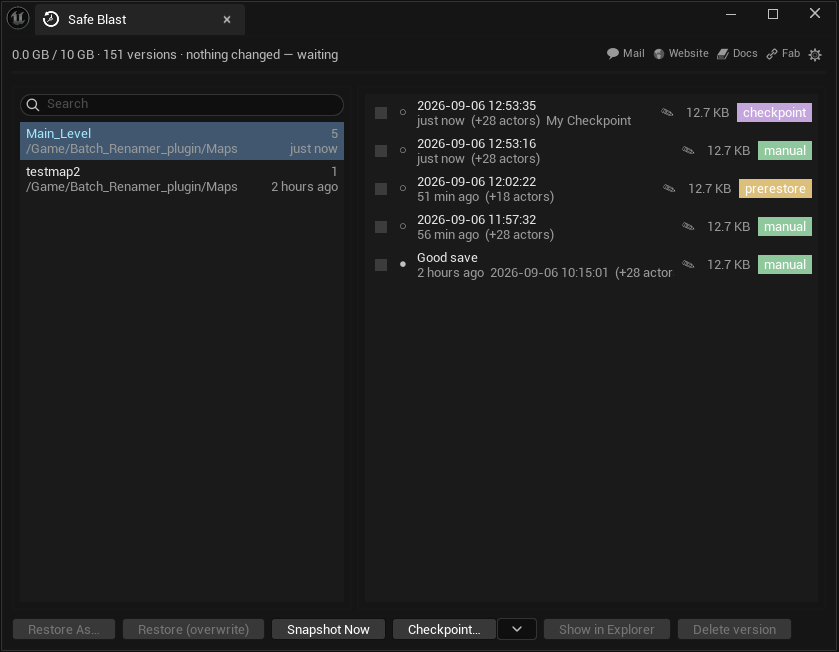
Assets on the left. Their history on the right.

The Safe Blast panel: assets on the left, versions on the right

The open level is named in its own colour. Each row is one moment in time — with the reason it exists, its size, and the name you gave it.

How It Works

It saves. You forget it exists. Then one day it matters.

There is nothing to set up and nothing to remember. Copies happen on every save and every few minutes in between. The only time you open the panel is the day something goes wrong — and on that day it is the only thing you need.

💾
Every Save, Every Few Minutes
Ctrl+S adds a version. The timer copies whatever you have changed and not saved — that is the one that matters at two in the morning. You choose the interval; the plugin never asks again.
🏷
Name It, Colour It, Pin It
Timestamps are honest and useless after the twentieth one. Call a version "this one worked", give it a colour, and pin the ones that must never be cleaned up. Names are searchable.
↩
Restore As, Or Overwrite
Restore As makes a copy next to the original and touches nothing. Overwrite puts the old version back in place — after a safety copy, a plain confirmation, and with an Undo waiting in the notification.
What You Get

A history you can read, and trust

01
📜
Whole Assets, Not Fragments
Blueprints return with every node, wire, variable and default. Levels return with actors, transforms, lights and landscape. Materials, meshes, animations, Niagara, sounds, data assets — anything in your Content folder. Even assets you deleted, if a copy exists.
02
🌐
World Partition, Handled
A partitioned level is a map file plus hundreds of actor files. Safe Blast keeps them as one snapshot and restores them as one. Before it writes, the dialog tells you how many actors come back and how many created since will be removed. You see the trade before you agree to it.
03
🛡
Careful By Default
A safety copy before every overwrite. Checked-out files handled through source control, never behind its back. An interrupted restore put back on the next start. Backups next to Content — not inside the Saved folder everyone is told to delete — and one click to move them to another drive.
Plainly

What it does not do

It is not source control
Git and Perforce measure in hours and days. Safe Blast measures in minutes — the ones between your commits. The history is local, on your machine, and it is yours, not your team’s. Use both; they do not overlap.
It restores assets, not the project
Restore one asset and only that asset moves back in time. Nothing that refers to it is touched. There is no button that rewinds a whole project, and there should not be.
Only what lives in the file
Whole asset files are copied, so everything inside one returns exactly. Project settings, .ini files, C++ and editor layouts are not assets and do not come back.
Who It Is For

One bad save costs more than this plugin.

Anyone who has lost an afternoon to a delete and a save in the wrong order. Level artists, technical artists, solo developers, and small teams who want a minute-to-minute history between commits. Editor-only, Unreal Engine 5.7, Windows.